
What Is AI Slop, and How Do You Keep It Out of Your Product?
Open five products launched this year. The same font, the same grey cards, the same rounded buttons.
There is a name for this now: AI slop.
What “AI slop” means
In December 2025 Merriam-Webster named “slop” its word of the year: low-quality digital content produced in quantity by AI. The word started with social media feeds, but it fits interfaces just as well.
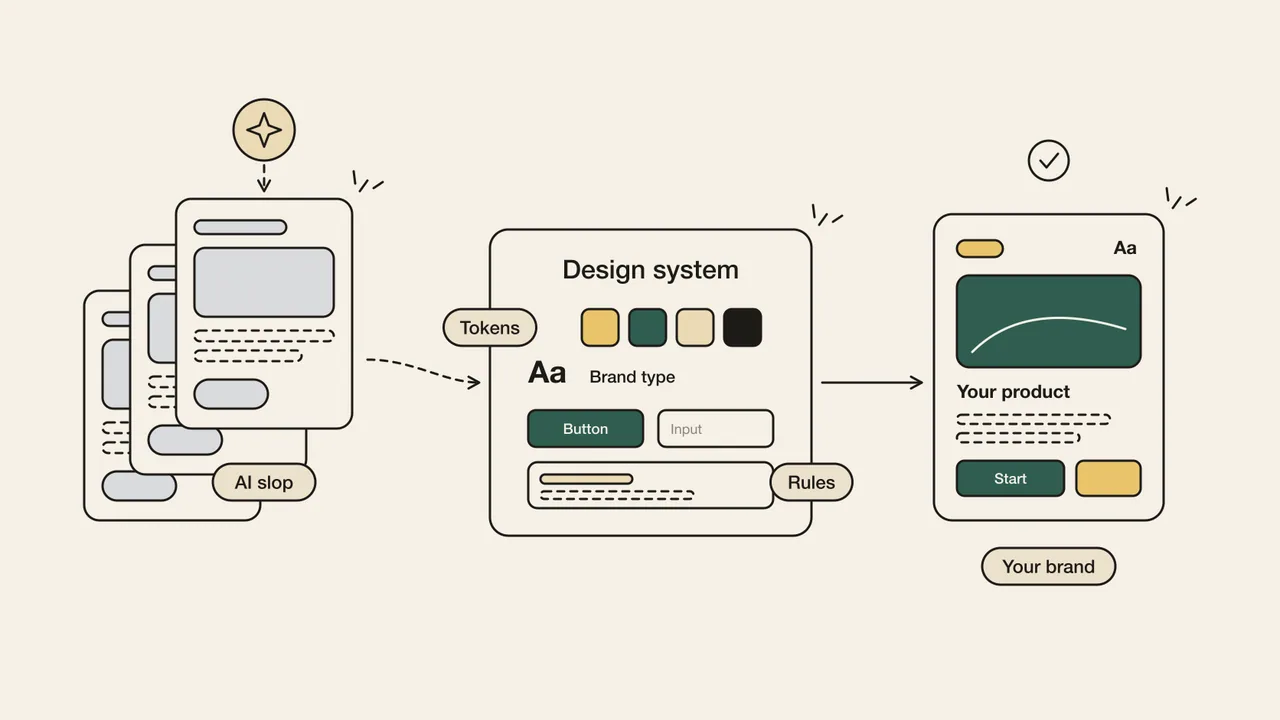
AI slop in a product doesn’t look broken. The screen works, the buttons click. It just says nothing about whose product it is. You can spot it quickly:
- The default font and the same neutral grey palette on every screen.
- The same icon set and the same soft-shadowed, rounded card.
- Polished copy that says nothing, such as “Unlock your potential”.
- Spacing and colours that change from screen to screen, because every prompt invents its own values.
Why everything looks the same
AI tools produce the average of what they have seen. In interface code, that average is increasingly one library: shadcn/ui. It is an excellent open-source component collection, and tools like v0 and Lovable use it by default.
The problem isn’t the library. Its defaults were meant as a starting point, not a finished design. When nobody changes them, thousands of products end up with the same face. The shadcn team saw this too and added a way to start projects with custom styles in December 2025.
We already wrote about why AI needs the context of a design system to stay consistent. This time the question is different: whose design is that context?
AI slop isn’t ugly. It’s anonymous.
shadcn/ui and Ladom UI: what’s the difference?
Both copy component code into your project with a command line tool, so the code is yours. The difference is where you start. Ladom UI is the design system we built for our own products:
- Starting point: shadcn/ui gives you a neutral kit to build your own design on. Ladom UI is a designed system, built one to one from its Figma file, so design and code share one source.
- Styling: shadcn/ui is styled with Tailwind utility classes. Ladom UI uses CSS Modules and design tokens as CSS variables (colour, typography, spacing, radius, shadow, motion), with no Tailwind dependency.
- Your brand at setup: Ladom UI asks for your brand colour and font when you install it and builds the theme from them. Corner style and density are options too.
- Product components: the fields real products need are already there: phone number, currency, one-time code, date and time pickers, file upload, bottom navigation.
- Rules for AI: one command adds a Claude Code skill that tells the AI to use the components, never hard-code a value and ask for your brand before setup.
If you have a design team that will build a system on top, shadcn/ui is still a strong choice. If you don’t, starting from a designed system is the shorter road.
How to do it: five steps
1. Look for the signs
Take ten screens from your product. List the font, the colours, the icon set and every raw colour or pixel value in the code. If most of it is a library default, you have found your slop. This is the first step of a UX Audit.
2. Decide your brand foundation
Write down four decisions: one brand colour, one font, one corner style, one density. Turn them into semantic tokens such as color-primary, not raw values.
3. Start from a designed system
Don’t build on a blank kit. With Ladom UI, setup takes two commands: npx ladom-ui init --brand "#2563eb" --font "DM Sans" builds the theme, and npx ladom-ui add button input copies in the components you need.
4. Give the rules to the AI
Add the skill with npx ladom-ui skill, or write the same rules into your project instruction file:
- Use an existing component whenever one fits.
- Never write a raw colour, spacing or font value.
- If the system has no match, say so instead of inventing one.
5. Review every screen against a slop checklist
Add four questions to every pull request:
- Does this screen use our font and our colours?
- Is there a raw value anywhere in the code?
- Does the copy say something specific to our product?
- Could this screen belong to any other company?
Conclusion
AI will keep producing the average. That won’t change. What you can change is whose average it is.
A design system built for your brand turns AI’s speed into your product, not into one more copy of everyone else’s.
If your product could belong to anyone, users will treat it as if it belongs to no one.